MaxKlicks
Services Process Pricing Contact ↗
Hybrid portals for GoHighLevel

GoHighLevel, made simple.

We build a simple portal on top of your GoHighLevel. Your staff see only the buttons they need. Your business gets custom logic that workflows can’t handle. Your data stays where it is.

The problem

Powerful, but overwhelming.

GoHighLevel can run your whole business. But your front desk, your nurses and your coordinators aren’t CRM experts, and they don’t need to be.

Your staff get lost

A simple job like moving an appointment means menus, filters, tabs and fields. People need training just to do the basics, and mistakes slip through.

?Where do I change the day? ?Which calendar is hers? ?Did that save? ?Who do I ask?

Workflows hit their limits

Real businesses have edge cases. Workflows can’t cover all of them, so you hire an expert or live with workarounds.

A client pays in two parts Workaround
An order runs late and needs a manager Needs an expert
Different steps for every service Not covered

That’s the question every portal we build starts from.

The solution

The hybrid portal.

GoHighLevel stays the engine. We give it a new face, built for the people who use it every day, and add the features it doesn’t have.

Keep GoHighLevel

Your contacts, calendars, payments and workflows stay in GoHighLevel. Nothing to migrate, and nothing you’ve built is thrown away.

Add a simple face

Each person gets a clean screen with only what their job needs. Moving an appointment takes a few clicks, not a training session.

Go past the limits

Custom logic runs in the portal for the cases workflows can’t handle, and every change syncs back to GoHighLevel.

What you get

What your portal does.

One screen per role

Front desk, nurses, managers and coordinators each get their own view, with their own buttons.

Tasks that run themselves

The portal creates follow-ups when something needs doing, and closes them when the work is done.

Custom rules

Escalations, deadlines, checklists and approvals that match how your business works, including the edge cases.

Two-way sync

Changes made in the portal save to GoHighLevel, and changes in GoHighLevel show up in the portal.

Fewer clicks

Everyday jobs, like checking in a client or moving a booking, are one screen and a few clicks.

Built on your data

Your records stay in GoHighLevel. The portal only adds what GoHighLevel can’t do on its own.
Built for each person

One screen per role.

Pick a role to see what that person would open each morning.

Today

Thursday · 4 appointments
9:00Emma ClarkeIV therapyChecked inMove
11:30James PatelNew client consultConfirmedCheck in
2:00Sarah MitchellBotox follow-upConfirmedCheck in
4:15Lena OrtizLab drawConfirmedCheck in

Example screens with sample data. Your portal is designed around your own roles and work.

Case study · Beyond Remedy

Already live.

Beyond RemedyCare operations portal, built on GoHighLevel

Beyond Remedy runs its clinic and mobile care on a MaxKlicks portal. GoHighLevel holds the clients, bookings and invoices. The portal gives each person their own screen and handles the steps that used to slip.

  • Unpaid invoices get a follow-up task that closes itself once they’re paid.
  • A paid invoice creates the pharmacy order, with 24 hours to submit it.
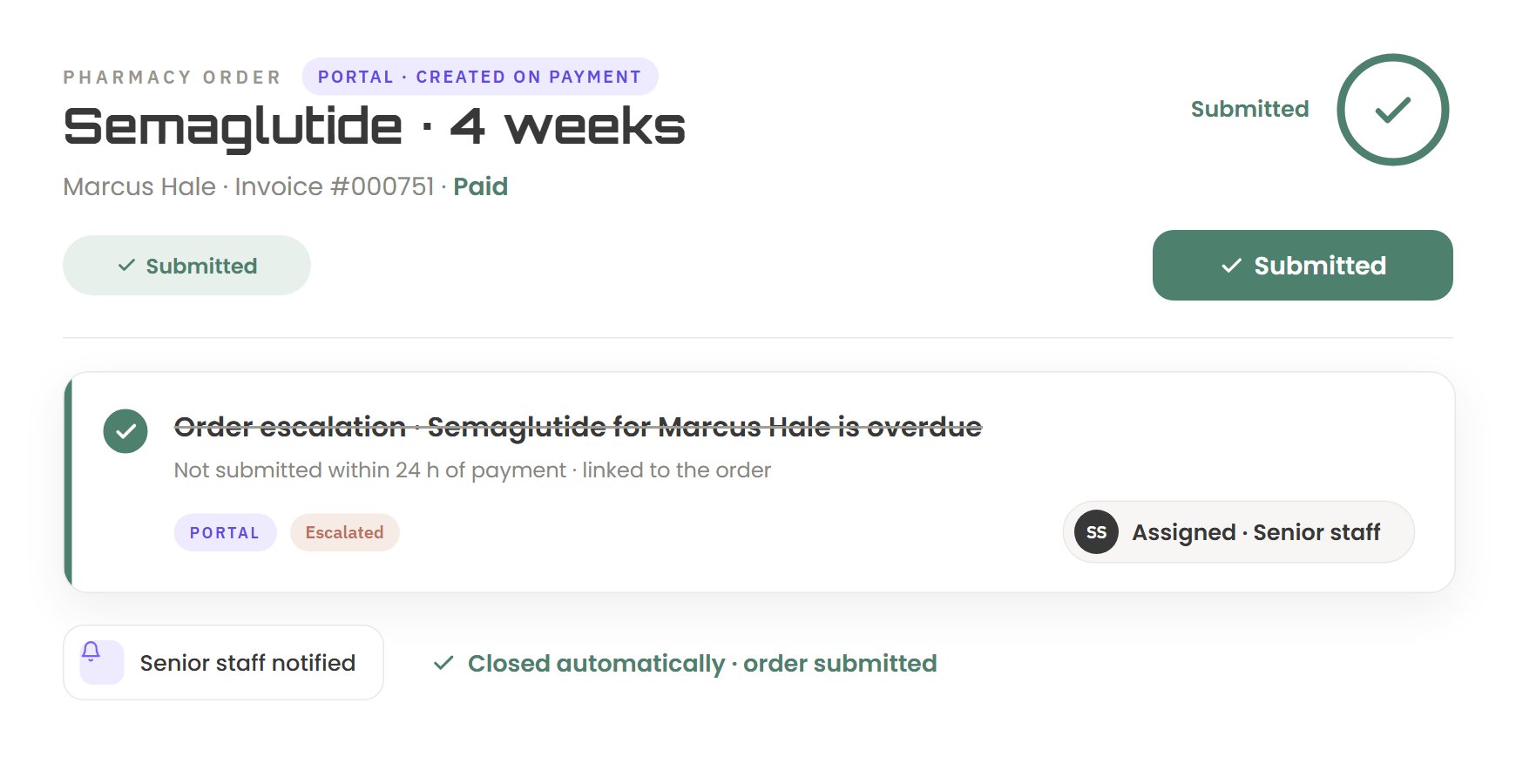
  • Late orders escalate to senior staff on their own.
  • Nurses see today’s visits and work through a checklist before a visit can close.
  • Client notes and documents sync back to GoHighLevel.

Screens from the Beyond Remedy portal. Client names shown are examples.

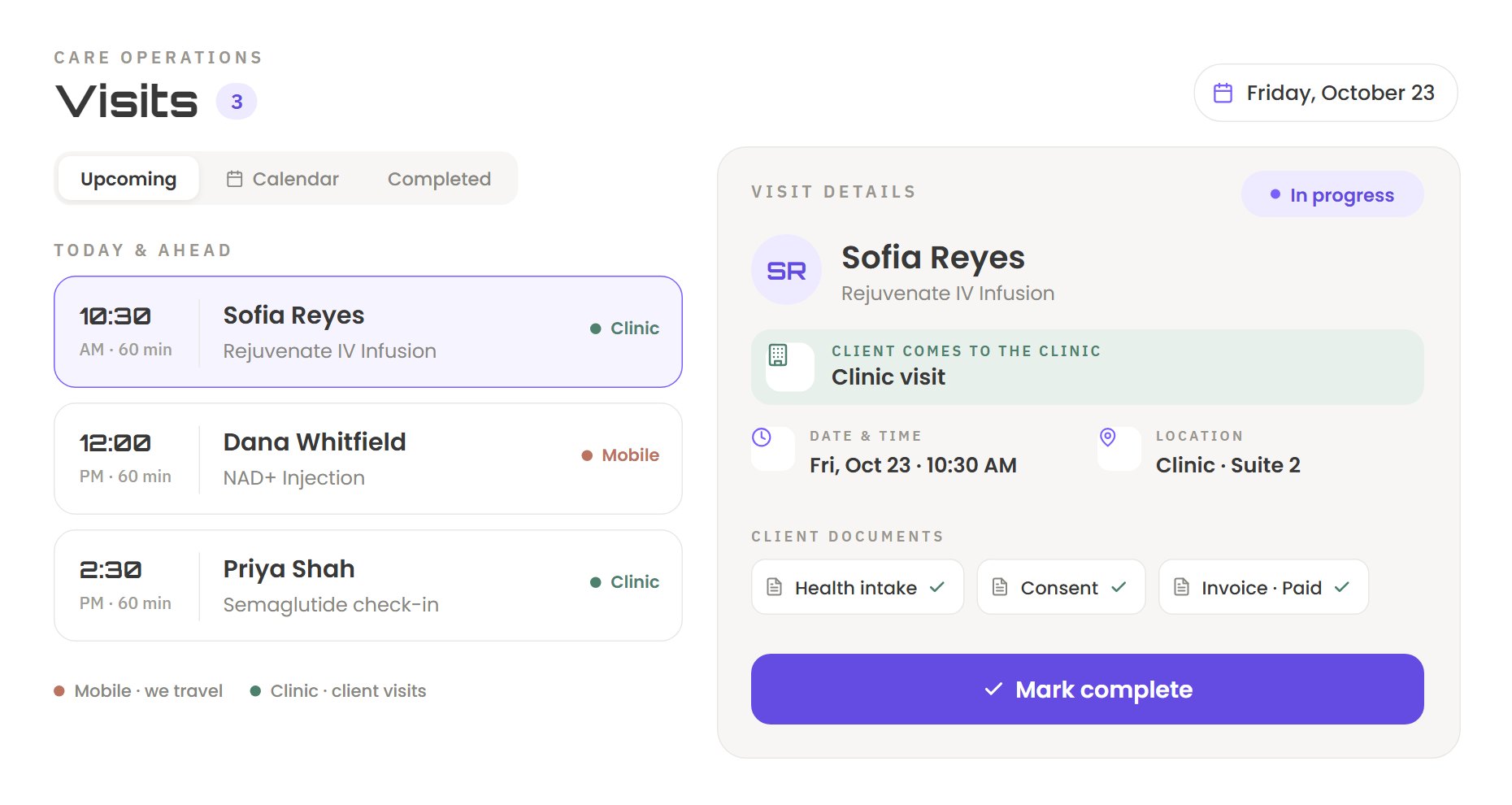
Beyond Remedy portal: visits screen
VisitsNurses see today’s visits, the client’s documents, and one button to start.
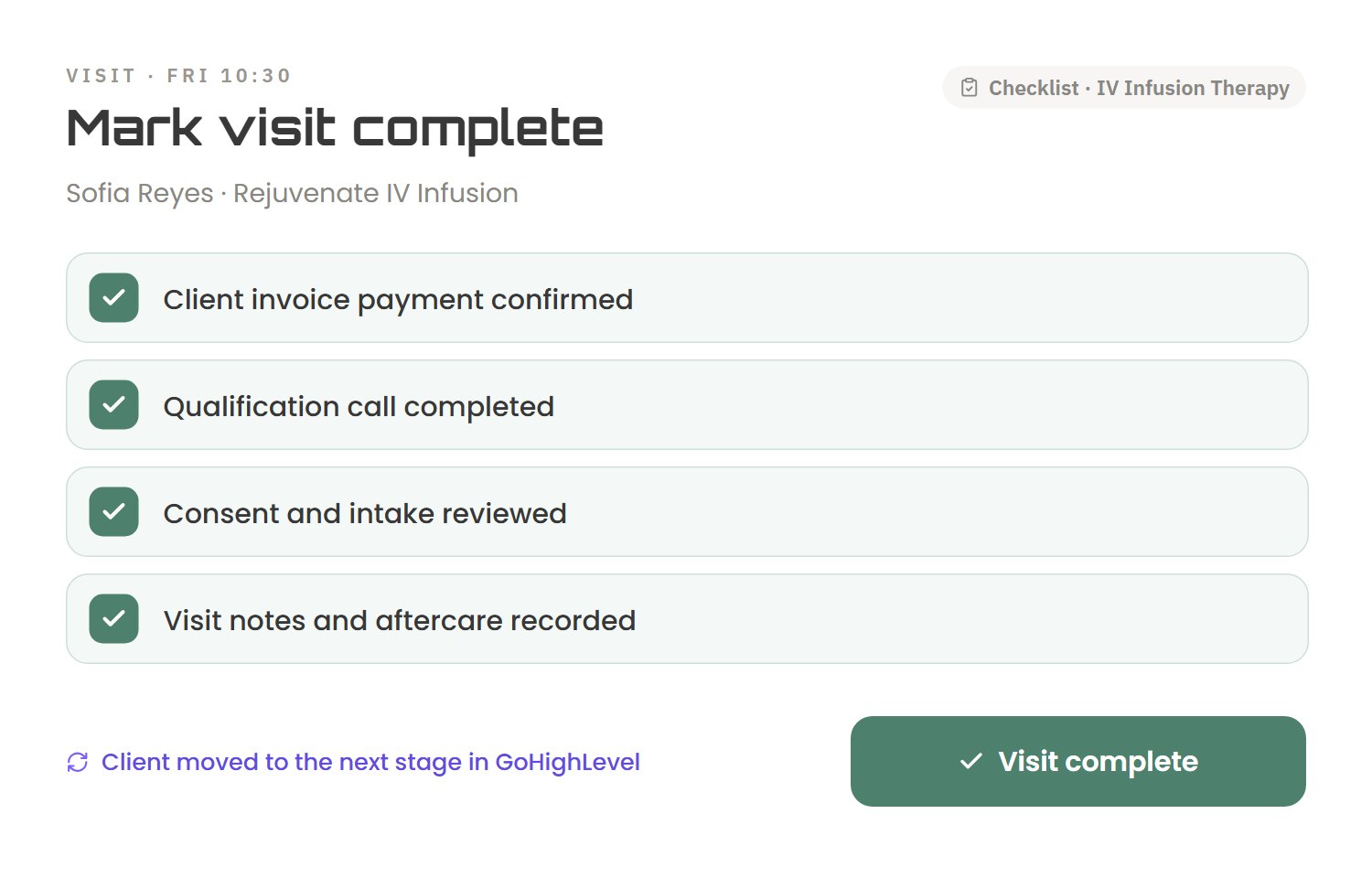
Beyond Remedy portal: visit checklist screen
Visit checklistA visit can’t close until every step on its checklist is done.
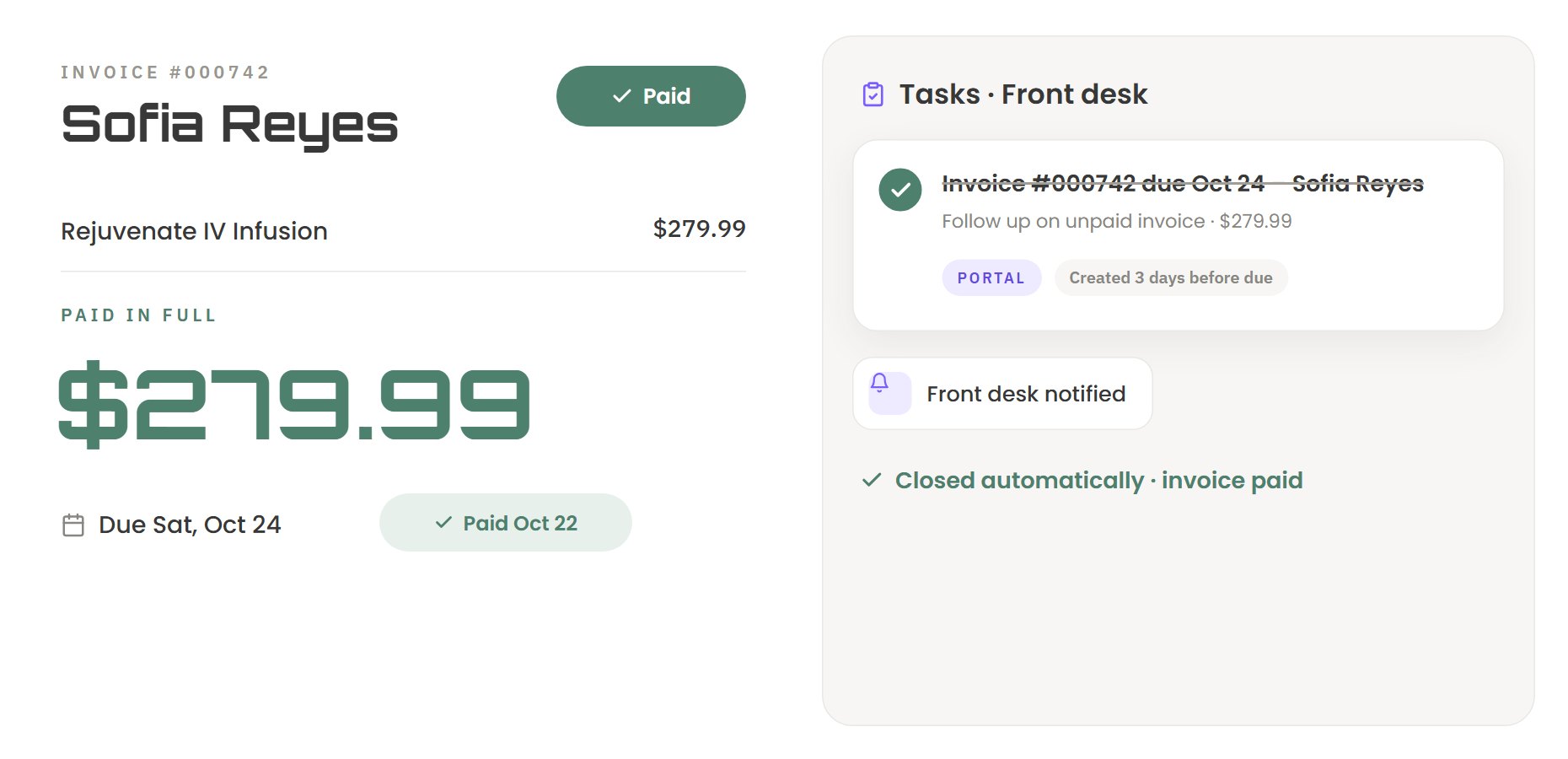
Beyond Remedy portal: invoices screen
InvoicesUnpaid invoices get a follow-up task that closes itself once they’re paid.
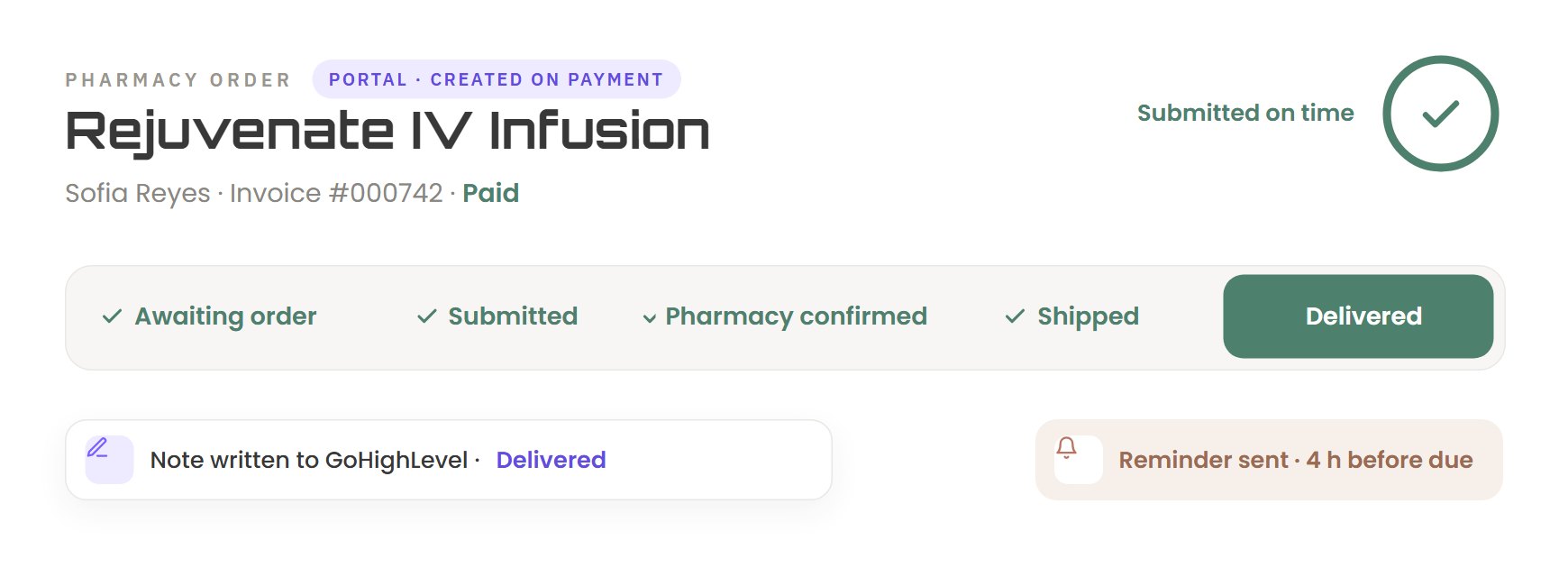
Beyond Remedy portal: pharmacy orders screen
Pharmacy ordersA paid invoice creates the order, and the portal tracks it to delivery.
Beyond Remedy portal: escalations screen
EscalationsAn order not submitted within 24 hours goes to senior staff, and closes itself once it’s submitted.
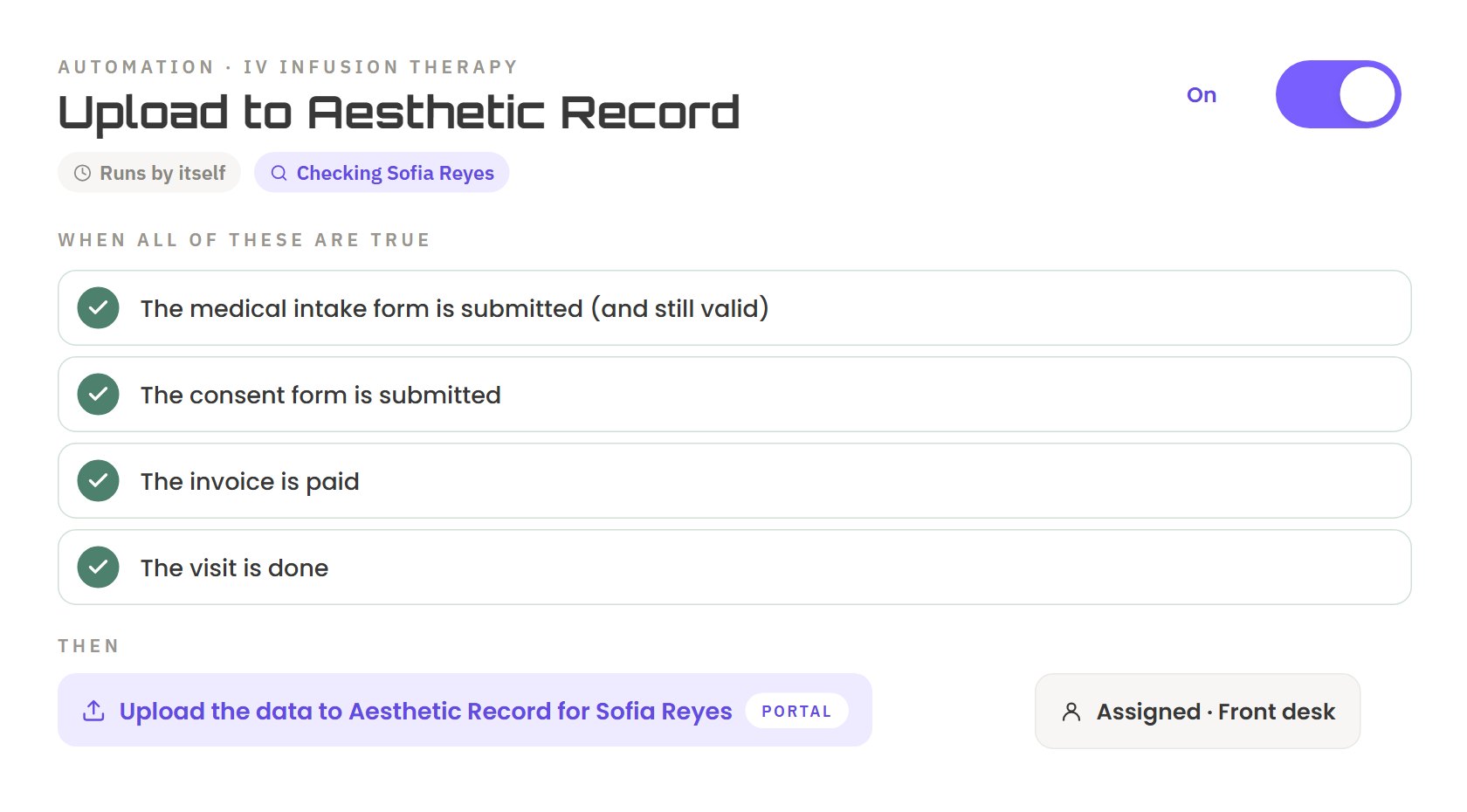
Beyond Remedy portal: automations screen
AutomationsWhen intake, consent, payment and the visit are done, the next task assigns itself.
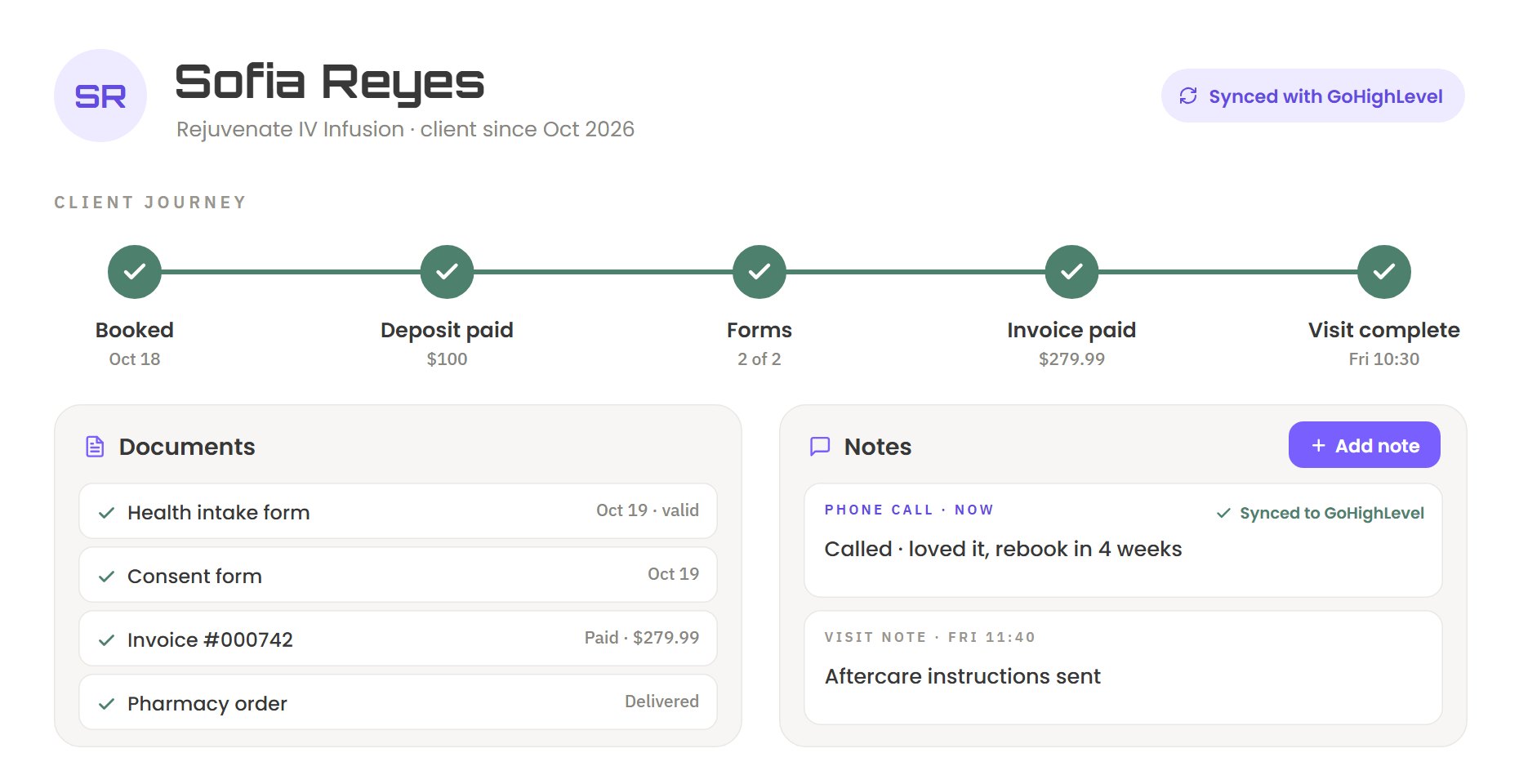
Beyond Remedy portal: client profile screen
Client profileEach client’s journey, documents and notes in one place, synced to GoHighLevel.
1 / 7
Our process

How we build.

We start with how your business runs, not with software. Six steps, with your team involved at each one.

  1. 01

    Understand

    We sit with your team and map how the business runs today: who does what, in which tool, and where the time goes.

  2. 02

    Audit

    We find the gaps: missed tasks, wasted clicks, and the limits your workflows can’t handle.

  3. 03

    Optimize

    We redesign the workflow first, so the portal fixes the process instead of copying it.

  4. 04

    Design

    We design clean screens for each role, showing only what each person needs.

  5. 05

    Review

    We brainstorm the design with you, share it with your team, and change it until it fits.

  6. 06

    Build & launch

    We build it, connect it to GoHighLevel, test it with your team and put it in production.

Who it’s for

Built around your business.

ClinicsMed spasDentalReal estateHome servicesLaw firmsGymsCoachesAgencies

A good fit if

  • You already run your business on GoHighLevel.
  • Your staff aren’t technical, and the CRM slows them down.
  • You’ve hit things your workflows can’t do.
  • You want features built for how your business works.
  • You’re an agency that wants portals for your clients, under your brand.
FAQ

Common questions.

Do we have to leave GoHighLevel?

No. GoHighLevel stays your engine. Your contacts, calendars, payments and workflows stay where they are, and the portal works on top of them.

Can my team still use GoHighLevel directly?

Yes. The portal and GoHighLevel stay in sync, so a change made in either place shows up in both.

What happens to our data?

Your records stay in GoHighLevel. The portal keeps only what it needs for the custom features GoHighLevel doesn’t have.

How long does a build take?

It depends on what your portal needs to do. After the audit, you get a clear scope and timeline before we start building.

What does it cost?

Every portal is built around one business, so we quote after we understand how yours runs. Book a call to get a custom quote.

Do you work with agencies?

Yes. We build portals as a white-label partner, delivered under your agency’s brand.

Free consultation

Make GoHighLevel simple.

Tell us how your team works today. We’ll look at where time goes and show you what a portal could take off their plate.

  • A call with the team that would build your portal.
  • We look at your current GoHighLevel setup and workflows.
  • You leave with ideas you can use, whether you build with us or not.

We’ll reply by email to set up a time.